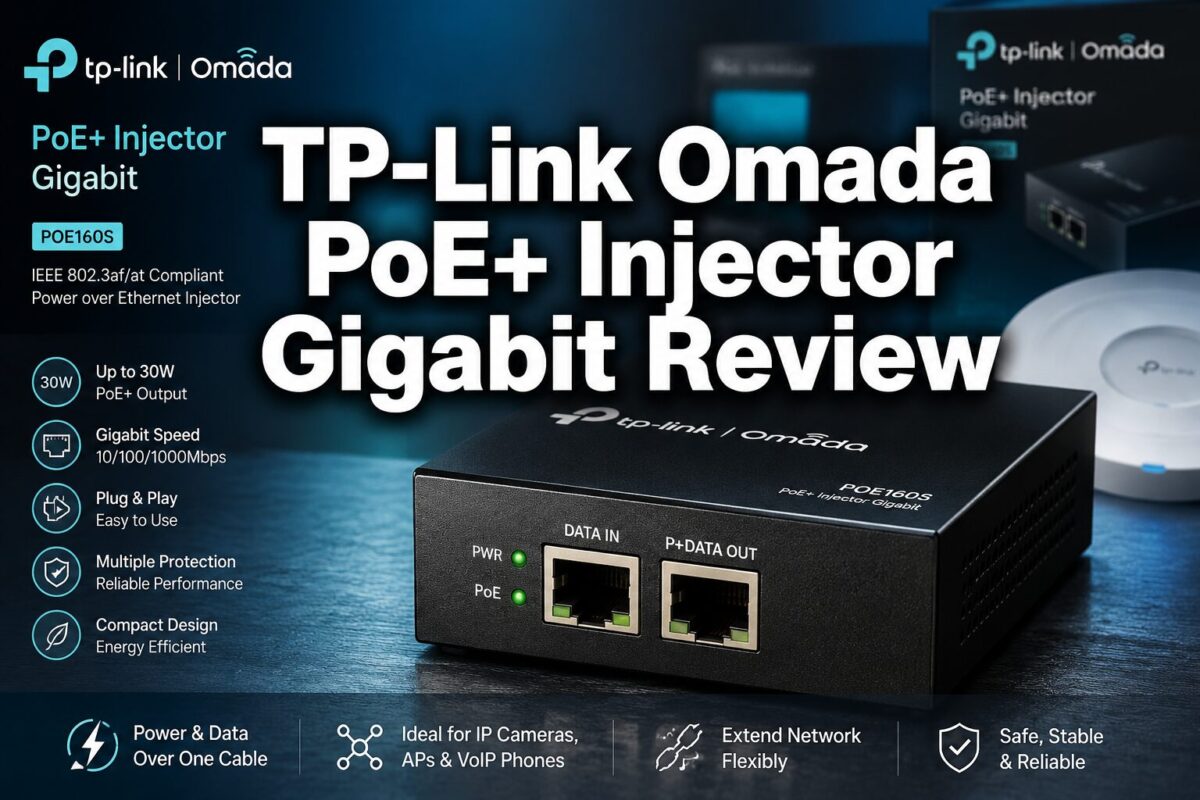
TP-Link Omada POE160S PoE+ Injector Introduction: Stop Running Extra Power Cables
Here’s a scenario I’ve seen play out dozens of times on job sites and in home installs alike. You’ve got a perfectly good gigabit switch sitting in a closet or equipment rack. It does its job moving data just fine. But now you need to add a wireless access point in a hallway ceiling, mount an IP security camera on the exterior soffit, or drop a VoIP phone at a desk, and your switch doesn’t push Power over Ethernet.
So what do you do? Run a separate power cable through finished walls? Pull a new circuit? Rip out your existing infrastructure and buy a whole new PoE switch?
None of those options are practical. None of them are cost-effective. And after 31 years in the trades, I can tell you that over-engineering a simple problem is one of the most expensive mistakes a homeowner or property manager can make.
The right answer is a PoE injector, specifically, the TP-Link Omada PoE+ Injector Gigabit (POE160S). It’s a small, purpose-built device that adds PoE capability to a single port on any existing switch, router, or network connection. No new wiring runs. No new switch. No electrician. Just plug it in, connect your device, and you’re done.
Let’s dig into whether this particular unit earns its place in your network toolkit.
Product Overview: What Is the POE160S and What Problem Does It Solve?
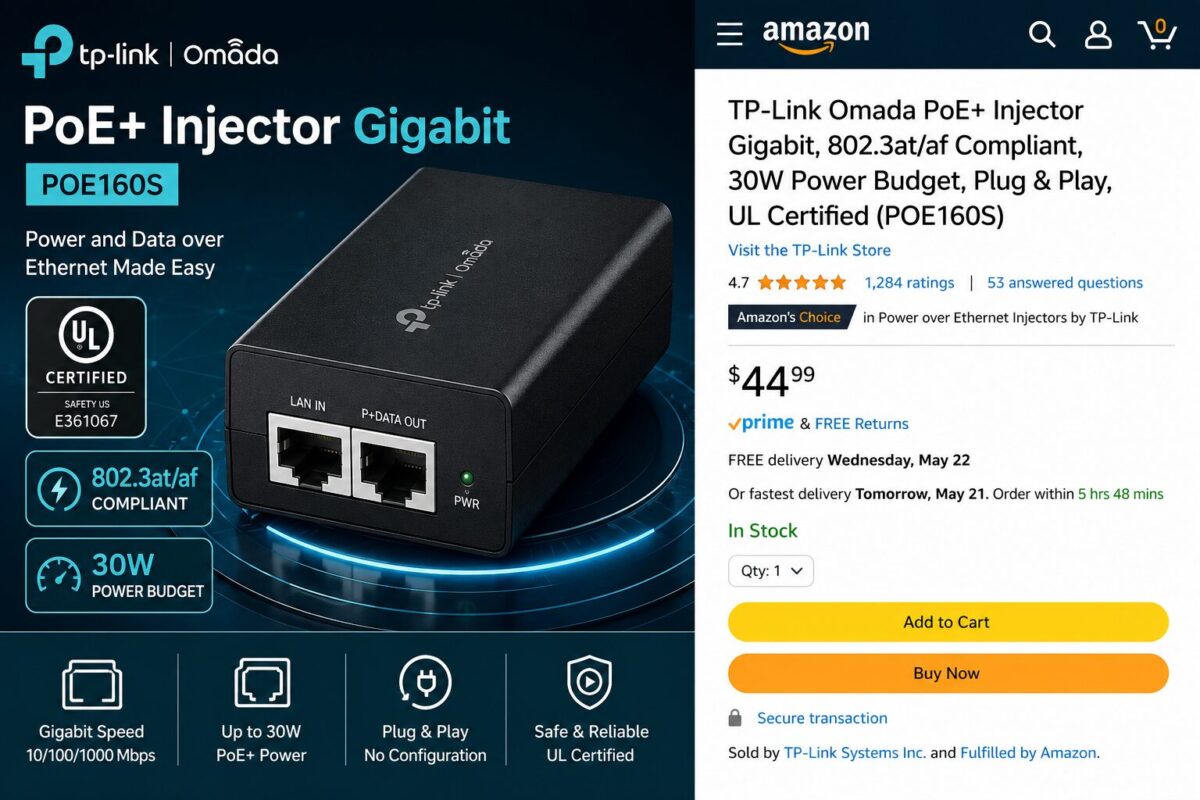
The TP-Link Omada POE160S is a single-port Gigabit PoE+ injector. Its sole job is to take a standard Ethernet connection, one that carries data only, and inject both data and electrical power onto the same cable so it can feed a downstream device that requires PoE to operate.
TP-Link is a well-established networking brand with a broad product ecosystem. The Omada line is their managed and semi-managed networking platform aimed at small businesses, home offices, and enterprise-lite deployments. The POE160S fits neatly into that ecosystem, though it works just as well as a standalone unit in any network setup.
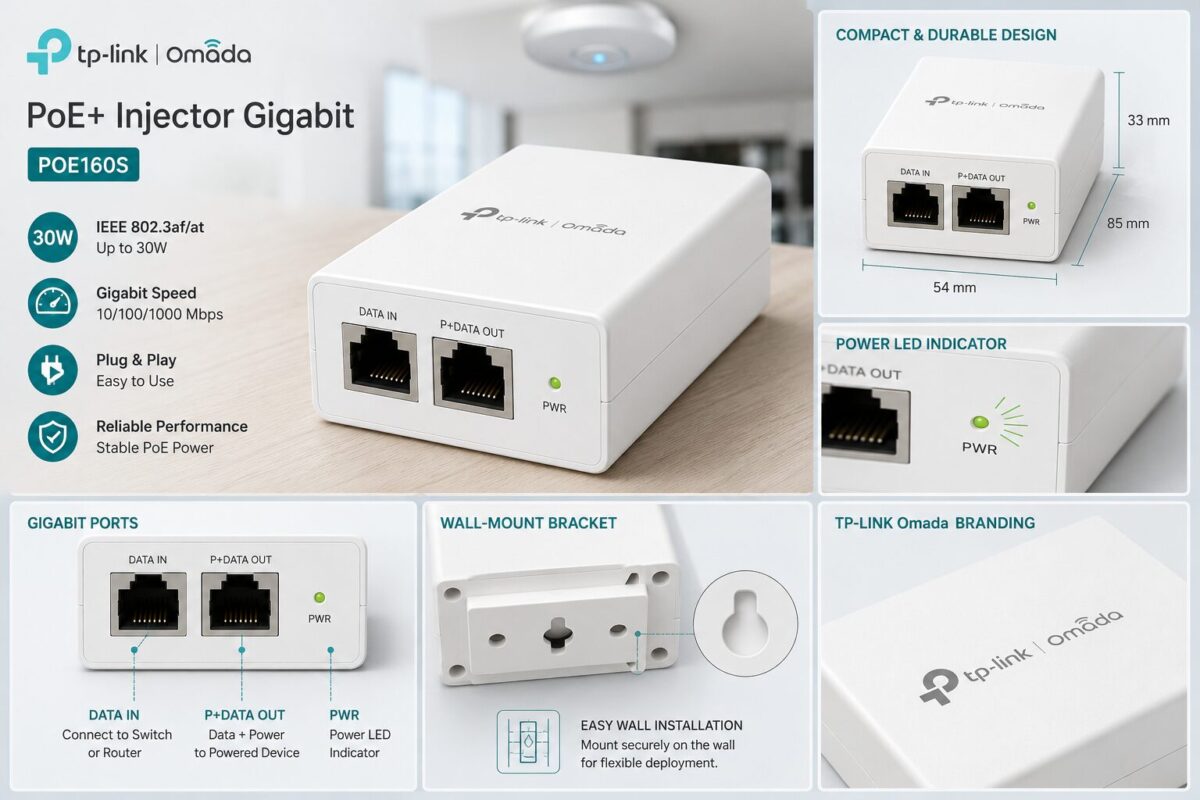
The device has two ports: a DATA IN port that connects to your existing switch or router, and a P+DATA OUT port that sends both power and data to your PoE-capable end device. A power LED confirms the unit is live. That’s it. The design is intentionally minimal because the job it’s doing doesn’t require complexity.
Priced at $44.99 (currently discounted from a list price of $54.99, an 18% savings), it sits in a reasonable range for a UL-certified, 802.3at-compliant injector with gigabit throughput. It’s available from 17 new sellers on Amazon with free shipping, which gives you solid purchasing flexibility.
Key Features Deep Dive
802.3at/af Compliance, The Standard That Matters
This is the first thing I check on any PoE injector, and the POE160S passes cleanly. It supports both 802.3af (up to 15.4W) and 802.3at (up to 30W) standards. Why does this matter in the real world?
Because PoE devices are not all created equal. A basic IP camera or a low-power wireless access point might only need 802.3af’s 15.4W. But a dual-band Wi-Fi 6 access point, a PTZ security camera with a heater, or a more demanding VoIP gateway will often require the full 802.3at spec at 30W. If your injector only supports 802.3af, you’ll get unreliable operation or no operation at all on those higher-draw devices.
The POE160S handles both. That means you buy it once, and it works across a wide range of devices, current and future.
30W Power Budget, Enough Headroom for Real Work
Thirty watts is the ceiling for 802.3at, and the POE160S delivers the full spec. In practical terms, this covers the vast majority of PoE-powered devices you’ll encounter in residential and light commercial installs: access points, IP cameras, VoIP phones, small outdoor displays, and network switches with PoE passthrough.
From a field-tested standpoint, 30W gives you enough headroom that you’re not riding the edge of the power budget. Devices that draw close to their rated wattage during startup, like PTZ cameras that spin motors during initialization, benefit from having that full 30W available rather than a derated supply.
Gigabit Throughput, No Data Bottleneck
The POE160S passes gigabit data speeds (10/100/1000 Mbps) without throttling. This is non-negotiable in 2024. If you’re running a modern network with a gigabit switch and gigabit-capable end devices, the last thing you want is a PoE injector that becomes a 100Mbps bottleneck in your data path.
This unit does not create that problem. Data passes through at full gigabit speeds, which means it’s compatible with high-resolution IP cameras streaming 4K footage, high-throughput Wi-Fi 6 access points, and any other bandwidth-intensive application you’re running.
Up to 100 Meters (328 Feet) Range
The 100-meter maximum cable run is the IEEE 802.3 standard for Ethernet over twisted-pair copper, and the POE160S supports it fully. In practical installation terms, this means you can run cable from your equipment closet or utility room to virtually any location in a typical residential or small commercial building without a repeater or extender.
For security camera installs along rooflines, access points in remote corners of a building, or VoIP phones at the far end of an office floor plan, 328 feet of reach covers the overwhelming majority of real-world scenarios. This is one of those specs that looks simple on paper but has major implications for where you can physically deploy your network devices.
Wall-Mountable Design, Clean, Professional Installation
The POE160S includes a wall-mount bracket, which is a detail that separates professional-grade gear from consumer throwaway products. Being able to mount this unit cleanly on a wall near a cable drop means no dangling device on a desk, no unit getting kicked under furniture, and no accidental disconnects.
For property managers and anyone doing a permanent install, not just a temporary setup, the wall-mount capability matters. It keeps the installation tidy, protects the unit from physical damage, and makes it look like a deliberate, professional deployment rather than a cobbled-together workaround.
Plug-and-Play Operation, Zero Configuration Required
There is no software. No app. No web interface. No firmware to update. You plug the power adapter into the wall, connect your data source to the DATA IN port, connect your PoE device to the P+DATA OUT port, and the LED lights up green. Done.
This is the correct design for a single-port injector. Configuration complexity would add nothing here. The plug-and-play approach means faster deployment, fewer failure points, and zero learning curve for homeowners or property managers who aren’t network engineers.
UL Certification, Safety You Can Trust
UL certification means this unit has been independently tested and verified to meet established safety standards for electrical products. For anything that’s going to be plugged into your home’s electrical system and left running 24/7, this matters. It’s not just a marketing checkbox, it’s confirmation that the power supply design, insulation, and thermal management have been evaluated by a third party.
Hands-On Experience: Real-World Usage Scenarios
Let me walk through how this unit performs in the kinds of installations where it actually gets used.
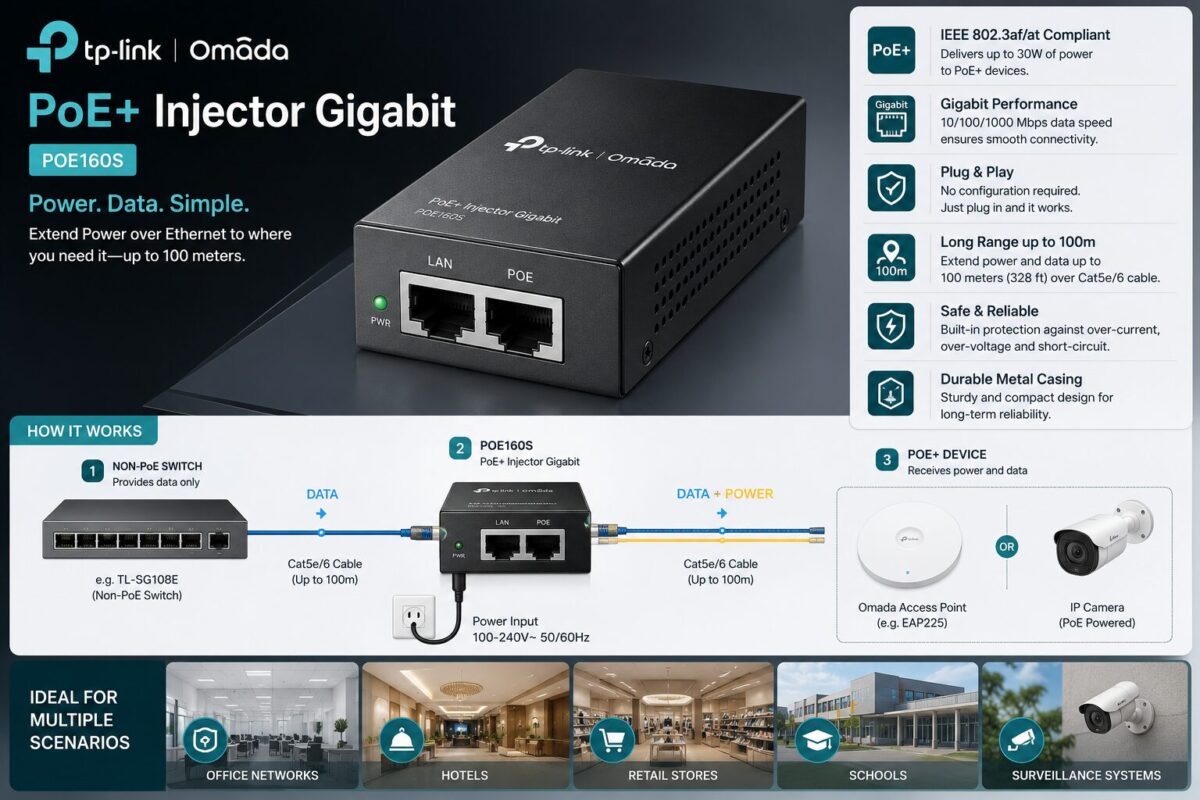
Scenario 1: Adding a Wireless Access Point to a Non-PoE Switch This is the most common use case. You have a basic gigabit switch, maybe it came with your router or you picked it up for $30, and you want to add a ceiling-mounted access point in a room that doesn’t have a power outlet nearby. The POE160S connects between your switch port and the access point. The access point gets both data and power through the single Ethernet cable. Clean, simple, no additional electrical work.
Scenario 2: Powering an IP Security Camera at a Remote Location Exterior security cameras are a prime application. You run a single Cat5e or Cat6 cable from your NVR or switch location to the camera mount point. The POE160S sits near the switch end, injecting power onto the line. The camera gets everything it needs through that one cable run. With 100 meters of range, you can reach most exterior mounting locations on a residential property.
Scenario 3: Enabling PoE on a Single Port of a Non-PoE Switch Maybe you have an 8-port gigabit switch and only one device in your network needs PoE. Buying a full PoE switch to replace a perfectly functional non-PoE switch is wasteful. The POE160S lets you add PoE capability to exactly the one port you need it on, without touching the rest of your infrastructure.
In all three scenarios, the unit performs exactly as specified. The gigabit throughput holds up. The 30W power delivery is stable. The plug-and-play operation means zero troubleshooting time.
Pros & Cons
✅ What We Love
- Full 802.3at/af compliance covers the widest range of PoE devices
- 30W power budget handles demanding devices without derating
- True gigabit throughput eliminates data bottlenecks
- 100-meter range supports full-building deployments
- Wall-mountable for clean, permanent installations
- Plug-and-play, no configuration, no software, no learning curve
- UL Certified for verified electrical safety
- Part of the TP-Link Omada ecosystem for users already on that platform
- Current pricing at $44.99 represents an 18% discount from list
❌ What Could Be Better
- Single-port only, if you need to add PoE to multiple ports, you’ll need multiple injectors (though a PoE switch may be more cost-effective at that point)
- No LED indicator for PoE device detection, the single power LED doesn’t tell you whether the downstream device is actively drawing power or has been detected
- Pricing transparency, the main product price appeared separately from the initial listing on the product page, which created some initial confusion during research
- No surge protection, for outdoor camera runs or installations in areas prone to electrical surges, you’ll want to add a separate inline surge protector on the cable run
Who Should Buy This?
The POE160S is the right tool for a specific set of people and situations.
Homeowners adding a security camera or access point to an existing network without PoE capability. If you’re running a single new device and don’t want to replace your switch, this is the most cost-effective solution available.
Property managers and landlords who need to add PoE devices to tenant spaces or common areas without major infrastructure changes. The wall-mount capability and plug-and-play operation make it easy to deploy and leave in place.
DIY network builders who are expanding their home network incrementally. The POE160S lets you add PoE capability exactly where you need it, exactly when you need it, without committing to a full PoE switch infrastructure.
TP-Link Omada ecosystem users who want consistent hardware branding and compatibility across their network gear.
Anyone doing a clean, permanent single-device PoE install where professional appearance and long-term reliability matter.
Who Should Skip This?
Users who need PoE on multiple ports. If you’re adding three or more PoE devices, the math changes. Multiple injectors at $44.99 each add up fast. At that point, a dedicated PoE switch becomes the more practical and cost-effective solution.
Anyone who needs 802.3bt (PoE++) for devices requiring more than 30W. High-power PTZ cameras with integrated heaters, some digital signage displays, and certain industrial devices exceed the 802.3at ceiling. This unit won’t power them reliably.
Users who need centralized PoE management. If you want to remotely cycle power to a device, monitor per-port power draw, or set PoE scheduling, you need a managed PoE switch, not a passive injector.
How to Get the Best Deal
At the time of this review, the POE160S is listed at $44.99 on Amazon, already discounted 18% from the $54.99 list price. With 17 new sellers offering the product with free shipping, pricing is competitive and delivery options are solid.
A few purchasing tips worth noting:
- Buy through Amazon for the return policy and buyer protection, especially if this is your first PoE injector and you want the option to return if it doesn’t fit your specific application.
- Check for coupons on the Amazon product page, TP-Link occasionally runs additional clip-on coupon discounts that stack with the existing sale price.
- Buy the right quantity upfront. If you’re planning to add two or three PoE devices over the next year, buying multiple units now at the current discount price makes sense rather than paying full list price later.
FAQ: TP-Link Omada POE160S
Q: Can I use the POE160S with any brand of PoE device, or does it only work with TP-Link equipment? A: It works with any device that complies with the 802.3at or 802.3af PoE standards, regardless of brand. TP-Link access points, Ubiquiti cameras, Cisco VoIP phones, if the device is standard-compliant, the POE160S will power it.
Q: Do I need to configure anything to get it working? A: No. This is a true plug-and-play device. Connect power to the unit, connect your data source to the DATA IN port, connect your PoE device to the P+DATA OUT port, and it works. There is no software, no app, and no web interface.
Q: What cable type do I need to use with the POE160S? A: Standard Cat5e or Cat6 Ethernet cable works correctly. For the full 100-meter range and to ensure reliable power delivery at 30W, Cat5e or better is recommended. Avoid using flat or outdoor-rated cables that don’t meet standard twisted-pair specifications, as they can cause power delivery issues.
Q: Will the POE160S work with my existing non-PoE router or switch? A: Yes. That’s exactly what it’s designed for. The DATA IN port connects to any standard Ethernet port, PoE or non-PoE, and the injector adds the power component before sending the combined signal out the P+DATA OUT port.
Q: Is the 30W power rating the total available, or is some of it consumed by the injector itself? A: The 30W refers to the power delivered to the connected device (PD, Powered Device). The injector draws additional power from the wall outlet to supply that 30W, but the downstream device receives the full 30W budget.
Q: Can I use this outdoors? A: The POE160S itself is designed for indoor use. However, you can mount it indoors near a cable entry point and run the cable outdoors to an exterior device. If the cable run passes through areas exposed to lightning or electrical surges, add an inline Ethernet surge protector on the outdoor cable segment.
Final Verdict
The TP-Link Omada POE160S does exactly what a single-port PoE+ injector should do, and it does it without unnecessary complexity, without cutting corners on specs, and without breaking the budget.
Full 802.3at/af compliance, true gigabit throughput, a 30W power budget, 100-meter range, wall-mount capability, and UL certification. Those aren’t marketing bullet points, they’re the actual specifications that determine whether a PoE injector performs reliably in the field. The POE160S checks every one of them.
After 31 years in the trades, my standard for any piece of infrastructure hardware is simple: does it do its job correctly, every time, without drama? The POE160S answers yes. It’s not glamorous. It’s not loaded with features you’ll never use. It’s a well-built, properly specified, field-tested tool that solves a real problem cleanly.
At $44.99 with an 18% discount currently applied, it’s priced fairly for what you’re getting. If you need to add PoE capability to a single port on an existing network, this is the unit I’d put in the wall.
SEO Meta Title: TP-Link Omada POE160S PoE+ Injector Review 2026
Building a secure, locally managed ecosystem means reclaiming full sovereignty over your home’s data and infrastructure. Transitioning away from unstable cloud subscriptions to a centralized, contractor-grade server footprint gives you complete command over your automation logs, security feeds, and system diagnostics.
Before running your initial integration loops or mounting physical components to your panel enclosure, check out our complete Honeywell Vista 20P Parts breakdown to audit your current configuration, calculate your auxiliary power draw, and verify that your hardwired expansion boards match a reliable, cloud-free blueprint.