The Honeywell Vista-20P Control Panel Review: What 31 Years in the Field Actually Teaches You
Every decade or so, the security industry tries to convince homeowners that the old way is dead — that cloud-connected plastic hubs and rolling monthly subscriptions have finally made hardwired panels obsolete.
After 31 years in the trades, I’ve watched that pitch cycle through at least three generations of “revolutionary” products, most of which are now landfill. The Honeywell Vista-20P Control Panel is not one of them.
This is the panel I installed in my own home. It is the system I trust with the safety of my family. And this Honeywell Vista-20P Control Panel review is going to tell you exactly why — not from a spec sheet, but from the terminal block out.
The Hook: What You’re Actually Looking At When You Open the Enclosure
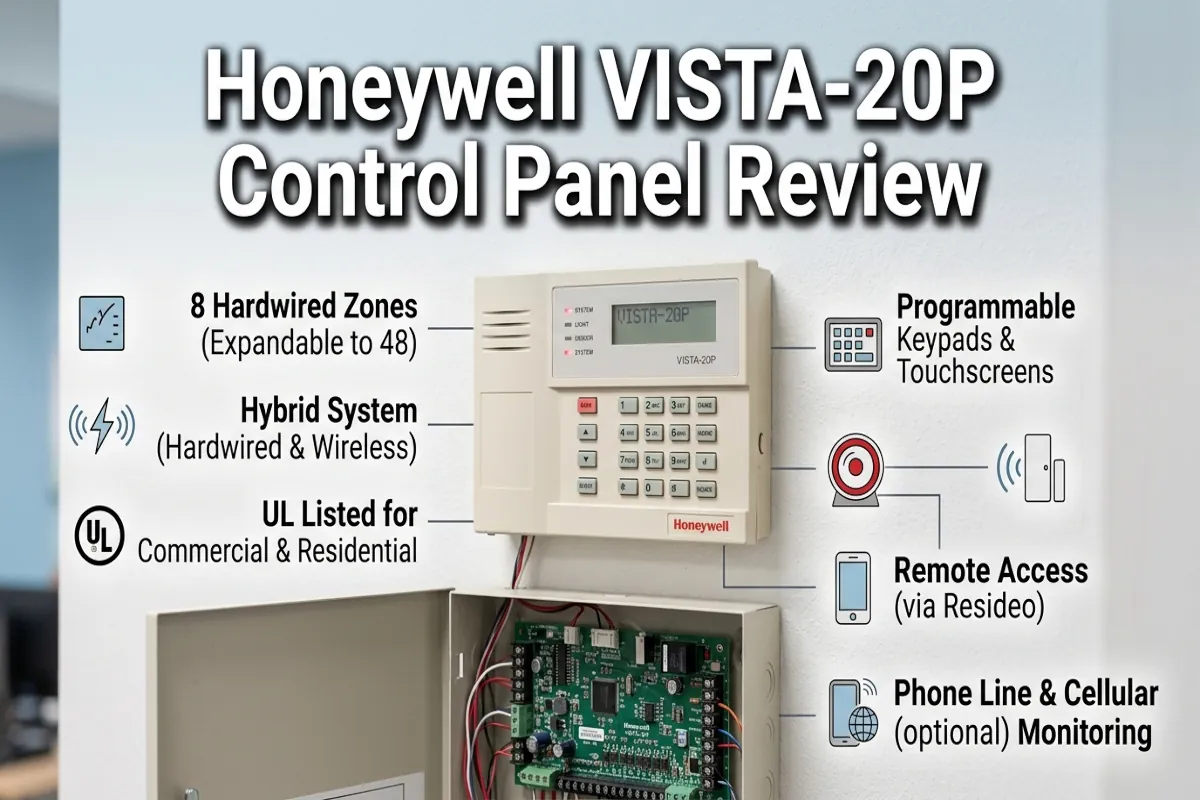
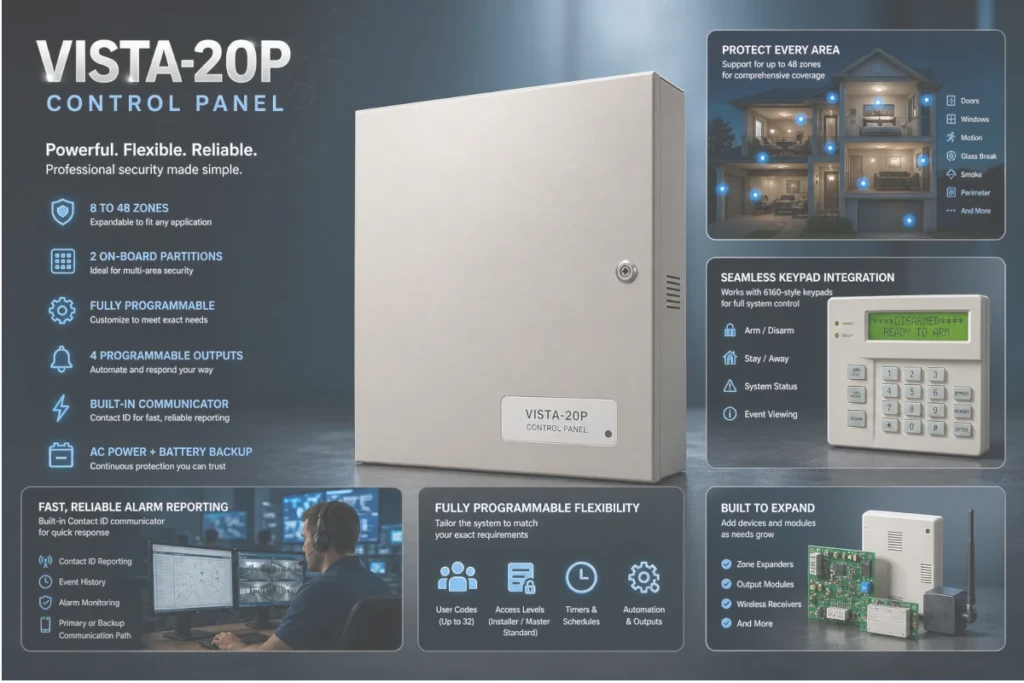
The Honeywell Vista-20P ships as a three-piece kit: the main control board, the 6160V alpha keypad, and the aluminum cabinet. When you open that cabinet for the first time, what you’re looking at is not a consumer product. It is a commercial-grade control architecture that has been deployed in residential, light commercial, and institutional security applications for decades.
The board layout is logical, well-labeled, and designed for field serviceability. Zone terminals are clearly numbered. The ECP bus terminals — the four-conductor bus that carries power and data to keypads, modules, and the Envisalink IP bridge — are clearly identified.
The battery leads are fused. The bell output is supervised. Every design decision on this board reflects a product engineered by people who understood that technicians would be working on it in low-light conditions, under time pressure, with a homeowner standing behind them.
That is what separates contractor-grade quality from consumer-grade convenience. The Honeywell Vista-20P was not designed to look good in an unboxing video. It was designed to work correctly for twenty years without a service call.
Core Technical Specifications of the Honeywell Vista-20P: The Numbers That Matter in the Field
Before diving into installation behavior and real-world performance, here is the technical baseline every installer and serious DIYer needs to know before committing to this platform:
- Zone Capacity: 8 hardwired zones onboard, expandable to 48 total zones via ECP bus zone expander modules or wireless enrollment through a 6160RF keypad.
- Partition Support: Dual-partition architecture — Partition 1 and Partition 2 can be armed and disarmed independently, making this panel the correct specification for homes with attached workshops, in-law suites, or secondary structures.
- ECP Bus: The Enhanced Communication Protocol bus supports keypads, zone expanders, relay modules, RF receivers, and IP communication modules on a single 4-conductor run. This is the backbone of the entire integration architecture.
- Wireless Compatibility: Fully compatible with the 5800-series wireless sensor platform operating on 345MHz. Wireless enrollment is handled through the 6160RF keypad’s integrated receiver — no separate RF module required.
- AC Power Input: 16.5VAC at 40VA via dedicated plug-in transformer. The onboard battery charger maintains a 12V sealed lead-acid backup battery at float voltage during normal operation.
- Auxiliary Power Output: 600mA at 12VDC for powering sensors and auxiliary devices directly from the panel. Systems with higher current draw require an external auxiliary supply such as the Altronix SMP3.
- Bell Output: 700mA supervised bell output for driving an external siren. Supervised means the panel monitors the bell circuit for open or short conditions and reports a trouble condition if the wiring is cut or shorted.
- User Codes: Supports up to 32 individual user codes with programmable authority levels — arm-only, full access, or guest — giving granular control over who can disarm the system.
- Communication: Onboard POTS dialer for central station reporting. For local-only, subscription-free operation, the dialer is disabled and the Envisalink EVL-4EZR IP module handles all network communication.
- Cabinet: Aluminum enclosure with a keyed lock. Tamper-resistant. Designed for surface mounting in a utility room, closet, or mechanical space.
What to Look For When Buying a Hardwired Control Panel: The Buying Guide
The Honeywell Vista-20P does not exist in a vacuum. If you are evaluating control panels for a residential installation, understanding what attributes actually matter — versus what marketing copy emphasizes — is the foundation of a sound purchase decision. Here is the diagnostic approach I apply when specifying a panel for any residential security project:
1. Zone Architecture and Expandability
A panel with a fixed zone count is a panel you will outgrow. The Vista-20P’s ECP bus architecture allows the system to grow from 8 hardwired zones to 48 total zones without replacing the main board.
That expandability is what makes it the correct long-term specification for a residential installation that may add sensors, detectors, or outbuildings over time. Any panel that does not support bus-based zone expansion should be disqualified for anything beyond a basic perimeter-only application.
2. Wired vs. Wireless Zone Support on a Single Platform
The best residential installations combine hardwired zones for perimeter doors and windows — where the structural integrity of the wired connection provides maximum reliability — with wireless sensors for interior spaces, attics, and locations where running wire is cost-prohibitive.
The Honeywell Vista-20P handles both on the same platform. Hardwired zones terminate directly at the board. Wireless zones enroll through the 6160RF keypad. Both report to the same partition, the same user interface, and the same event log. That unified architecture is a critical field advantage.
3. Local Integration Capability Without Cloud Dependency
Any panel you specify in 2024 and beyond must have a credible path to local smart home integration that does not depend on a manufacturer’s cloud service. When that service is discontinued — and eventually, it always is — a cloud-dependent panel becomes a paperweight. The Honeywell Vista-20P’s ECP bus supports the Envisalink EVL-4EZR IP module, which provides a fully local API that Homebridge reads in real time. Your panel data stays on your network. Apple Home sees every zone and every partition as a native sensor. No subscription. No cloud. No expiration date.
4. Serviceability and Long-Term Parts Availability
The Honeywell Vista-20P has been in continuous production for decades. The 5800-series wireless sensors that pair with it are still manufactured and widely available. The Envisalink integration stack is actively maintained. When you specify a panel for a residential installation, you are making a 15-to-20-year commitment. Choose hardware with a demonstrated track record of parts availability and an active support ecosystem — not a startup’s first-generation product with a three-year roadmap.
5. Programming Transparency
A panel you cannot program yourself is a panel that keeps you dependent on a monitoring company or a technician for every change. The Honeywell Vista-20P’s installer programming mode is fully documented, field-accessible via any 6160-series keypad, and structured around a logical numbered data field system. Every zone type, every output relay, every communication parameter is addressable and modifiable by the homeowner or DIYer who takes the time to learn the programming architecture. That transparency is a feature — not a liability.
Honeywell Vista-20P Control Panel Review: Real-World Field Performance
This Honeywell Vista-20P Control Panel review is not based on a weekend test. It is based on hands-on experience with this platform across multiple residential installations, including the system currently running in my own home. Here is what field performance actually looks like on this panel:
Zone Response and Supervision
Hardwired zones on the Honeywell Vista-20P respond in under 400 milliseconds from sensor trip to panel acknowledgment. That is not a spec sheet number — that is observable behavior at the keypad during a walk test. The panel’s end-of-line resistor supervision scheme monitors every hardwired zone for open circuit, short circuit, and normal conditions simultaneously. A cut wire is a trouble condition, not a silent failure. That level of supervision is standard on commercial panels and rare on consumer-grade systems.
ECP Bus Stability
The ECP bus is the nervous system of the Vista-20P installation. In a correctly wired system — 22/4 stranded wire, properly terminated, with no excessive run length — the bus is rock-solid. Keypads respond instantly. The Envisalink module maintains a continuous connection to the local API without polling delays. The only ECP bus instability I have encountered in field installations traces back to one of three root causes: incorrect wire gauge, a loose terminal connection, or an address conflict between two devices assigned the same bus address. All three are installation errors, not hardware failures.
Envisalink Integration and Apple Home Behavior
The Envisalink EVL-4EZR connected to the Honeywell Vista-20P’s ECP bus and running the homebridge-envisalink plugin delivers a seamless Apple Home integration experience. Every armed partition appears as a native security system tile. Every zone appears as a contact or motion sensor. Automations trigger correctly. The integration is local, fast, and stable. This is the correct architecture for a homeowner who wants Apple Home security monitoring without paying a monthly fee to anyone.
Backup Power Performance
The Vista-20P’s onboard battery charger maintains a 12V sealed lead-acid battery at float voltage continuously. During a power outage, the transition to battery power is seamless — no keypad reset, no zone faults, no communication interruption. A 12V 7Ah battery in a system with one keypad and one outdoor siren will provide well over 24 hours of standby time. That is the correct specification for residential backup power in any geography that experiences extended outages.
Common Questions: Vista-20P Compatibility and Troubleshooting FAQ
Q: Can the Vista-20P integrate with Apple Home without a monthly subscription?
Yes — and this is one of the primary reasons the Vista-20P is the correct specification for a subscription-free smart home security build. The integration path is: Vista-20P ECP bus → Envisalink EVL-4EZR IP module → Homebridge running on a local server (Synology NAS, Raspberry Pi, or Mac Mini) → Apple Home. Every component in that chain operates locally. Your panel data never leaves your network. There is no cloud handshake, no monitoring fee, and no service that can be discontinued by a vendor decision. For live camera integration inside Apple Home, Scrypted running on the same local server translates RTSP camera streams into HomeKit-compatible feeds — completing a full local security ecosystem.
Q: What is the correct end-of-line resistor value for the Vista-20P?
The Vista-20P uses 2.2kΩ end-of-line resistors for standard hardwired zone supervision in the default configuration. These resistors are wired in series at the sensor end of the zone loop — not at the panel terminal. The panel monitors the zone circuit resistance continuously: a normal closed circuit reads approximately 2.2kΩ, an open circuit (triggered sensor or cut wire) reads infinite resistance and generates an alarm or trouble condition, and a short circuit reads near-zero resistance and generates a fault. This three-state supervision scheme is what makes hardwired zones categorically more reliable than unsupervised wireless-only installations.
Q: How many keypads can the Vista-20P support on a single ECP bus?
The Vista-20P supports up to eight addressable devices on the ECP bus simultaneously. That pool of eight addresses is shared across all bus devices — keypads, zone expanders, relay modules, RF receivers, and the Envisalink module all draw from the same address pool. In a standard residential installation with one or two keypads, the Envisalink module, and a zone expander, you will use four to five of the eight available addresses, leaving ample headroom for future expansion. Each keypad requires a dedicated address set in the keypad’s onboard DIP switches before installation — address conflicts are the most common ECP bus troubleshooting scenario in DIY installations.
The Manufacturer: Why Resideo’s Backing Matters for Long-Term Parts Support
The Vista-20P is manufactured under the Resideo Technologies brand — the security and comfort controls division spun out of Honeywell in 2018. Resideo maintains the Vista platform, continues to manufacture the 5800-series wireless sensor line, and actively supports the installer and DIY communities with technical documentation. That institutional backing is a significant factor in the long-term parts availability calculation for any Vista-20P installation. This is not a startup product. It is a platform with decades of production history and an active manufacturing infrastructure behind it.
Final Recommendation: The Verdict After 31 Years in the Trades
This Honeywell Vista-20P Control Panel review comes down to one question: do you want a security system you own, or one you rent? Every subscription-based consumer system on the market today is a rental. You pay monthly for features that are already built into the hardware. You depend on a company’s continued operation for your system to function. You surrender local control for the convenience of an app. The Vista-20P is the alternative. It is hardwired, locally controlled, fully programmable, and capable of integrating with Apple Home without sending a single byte of data to an outside server. It is the most field-tested residential control panel available, and it is the correct specification for any homeowner who takes security seriously enough to build it right.
The three-piece kit — board, keypad, and cabinet — gives you everything you need to begin a complete residential installation. The ECP bus architecture gives you a growth path to 48 zones. The Envisalink integration gives you Apple Home without a subscription. And the aluminum enclosure gives you a tamper-resistant, professionally finished installation that will still be running correctly in twenty years.
Check Current pricing on the Honeywell Vista-20P 3-Piece Kit on Amazon and build a system that does not have an expiration date.
If you are building out the full system from scratch and need a complete, curated bill of materials — every sensor, keypad, wire gauge, connector, and power supply specified for a production residential installation — the Honeywell Vista-20P 3-Piece Kit on Amazon is your starting point. From there, the complete hardware stack is documented in the resource vault below.
Build the Complete System: Every Part, Specified and Sourced
The Vista-20P control panel is the brain of the system — but a brain without a nervous system is just a board in a box. Every sensor, keypad, wire run, connector, and power supply that belongs in a complete contractor-grade Vista-20P installation is documented, specified, and sourced in the Honeywell Vista-20P parts guide at cdavidchase.com.
That resource covers the full hardware stack from the Envisalink IP module and 6160RF keypad through the 5800-series wireless sensor fleet, the Altronix auxiliary power supply, the correct wire gauges for every run type, and the finishing supplies that separate a professional installation from a weekend hack job. If you are committed to building this system correctly, that is your next stop.
Every specification, wiring standard, and integration method covered in this review is drawn from 31 years of production-scale contracting work and real-world troubleshooting on residential security systems. This is not theoretical guidance. It is the same field-tested methods and diagnostic approach applied to every installation documented on this site — distilled into a format any serious homeowner or DIYer can execute with confidence. View the full specifications and buy the Honeywell Vista-20P on Amazon and build it right the first time.
As an Amazon Associate, I earn from qualifying purchases at no extra cost to you.