Is This 4-Bay Powerhouse the Right Private Cloud for Your Home or Small Business?
Synology DS425+ NAS Review
If you’ve ever lost a hard drive full of irreplaceable photos, watched a small business grind to a halt because a laptop died, or paid monthly cloud storage fees that never stop climbing, you already understand why a dedicated NAS (Network Attached Storage) device is worth taking seriously.
After 31 years working hands-on with infrastructure, networking, and data systems in both residential and commercial settings, I can tell you straight: the right NAS device isn’t just a storage box.
It’s a field-tested, long-term solution to data vulnerability, accessibility, and privacy. The Synology DS425+ is one of the most talked-about 4-bay NAS units on the market right now, and in this review, I’m going to break it down completely, no fluff, no filler, just real-world analysis you can actually use.
Product Overview: What Is the Synology DS425+?
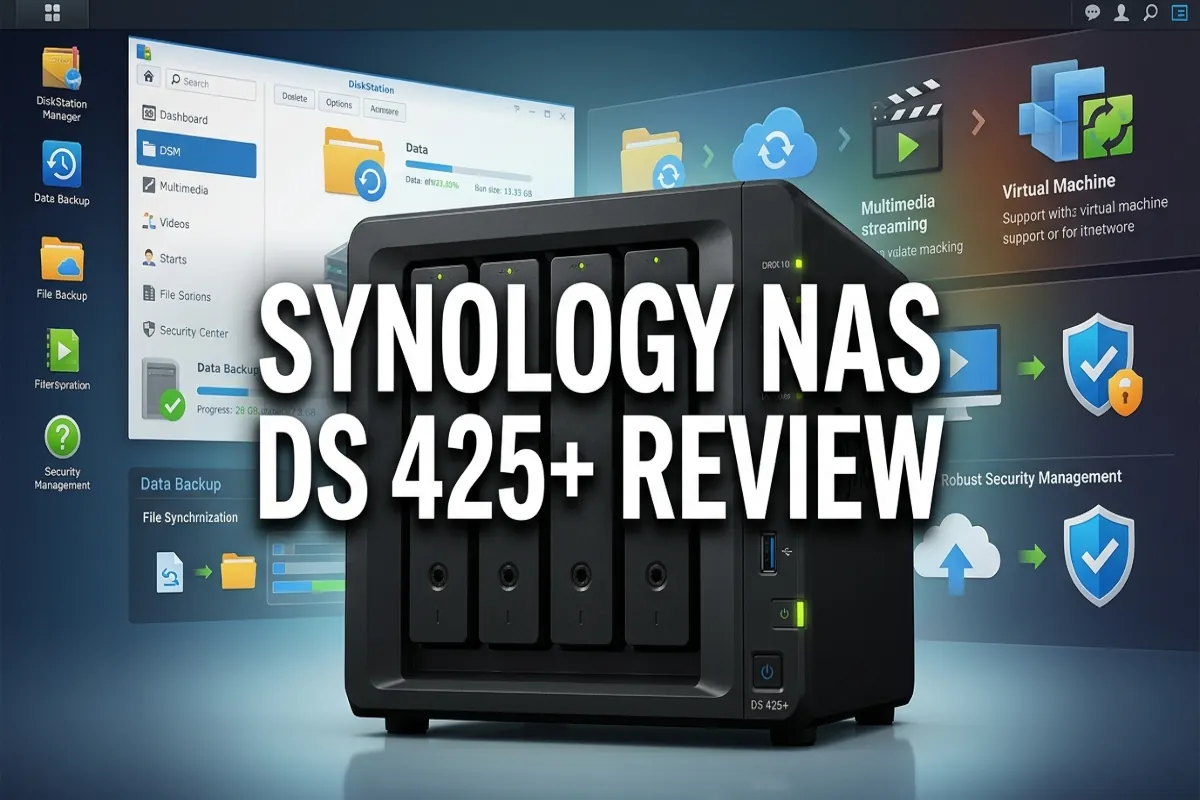
The Synology DS425+ is a 4-bay diskless NAS enclosure built for private cloud storage, media streaming, file backup, and network-level file sharing. “Diskless” means the unit ships without hard drives, you supply your own, which gives you full control over capacity and drive quality from day one.
Synology is a Taiwanese company with a rock-solid reputation in the NAS space. They’ve been building these systems for over two decades, and their DiskStation Manager (DSM) operating system is widely regarded as the most polished, user-friendly NAS OS available. The DS425+ sits in Synology’s Plus series, their sweet spot between entry-level home units and full enterprise-grade rack systems.
At its core, the DS425+ solves three critical problems:
- Data vulnerability, Your files live on your hardware, under your roof, with redundancy you control.
- Monthly subscription fatigue, No recurring cloud fees. You own the infrastructure outright.
- Centralized access, One hub for every device in your home or office to back up, stream, and share files.
This unit is designed for power users, home lab enthusiasts, small businesses, and residential property managers who need contractor-grade reliability without enterprise-level complexity.
Key Features Deep Dive
1. Quad-Core Processor & Upgraded RAM
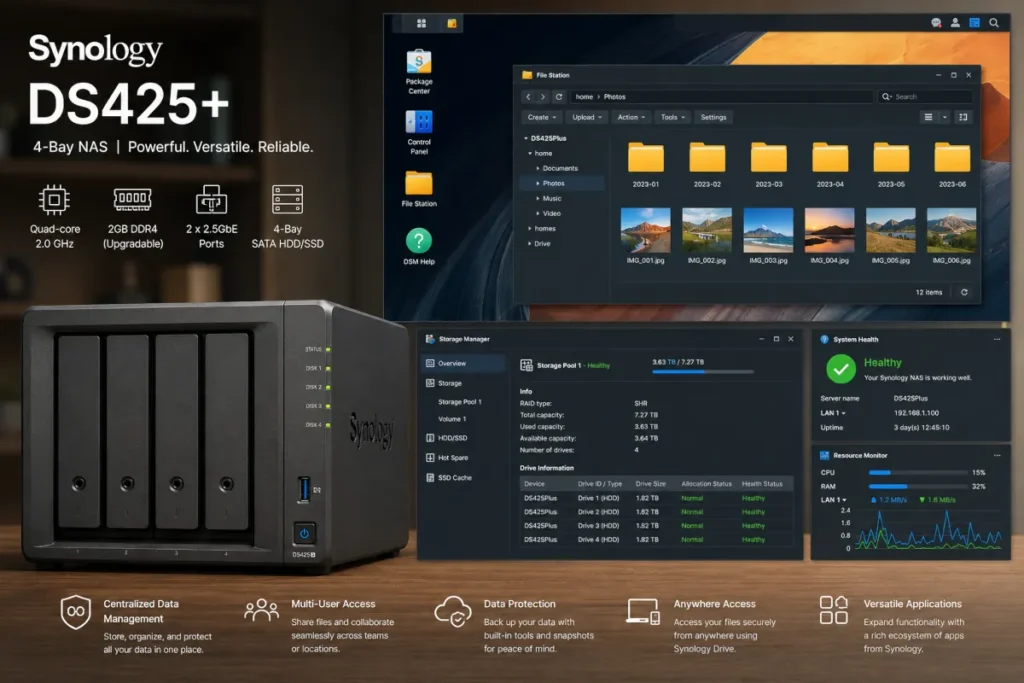
The DS425+ is powered by an Intel Celeron J4125 quad-core processor running at 2.0 GHz (burst up to 2.7 GHz), paired with 2GB DDR4 RAM (expandable up to 6GB). This is a meaningful upgrade over budget NAS units running ARM-based chips.
Why does this matter in practice? Because when you’re running simultaneous tasks, transcoding a 4K video file, syncing backups from three workstations, and serving Plex media to two TVs at the same time, a weak processor becomes the bottleneck immediately. The J4125 handles multi-threaded workloads with composure. It’s not a server-room beast, but it’s more than capable for the use cases this unit is designed for.
The RAM expandability is a smart design choice. Out of the box, 2GB is workable. But if you plan to run Docker containers, virtual machines, or multiple Synology packages simultaneously, bumping to 6GB is a straightforward upgrade that dramatically improves performance.
2. Four Drive Bays, Flexibility and Redundancy
Four bays is the magic number for most serious home and small business users. Here’s why: with four drives, you can configure RAID 5 (which gives you the storage capacity of three drives while protecting against one drive failure) or RAID 6 (protection against two simultaneous drive failures, though you sacrifice more usable space). Synology’s own SHR (Synology Hybrid RAID) is also available and is excellent for mixed-capacity drive configurations.
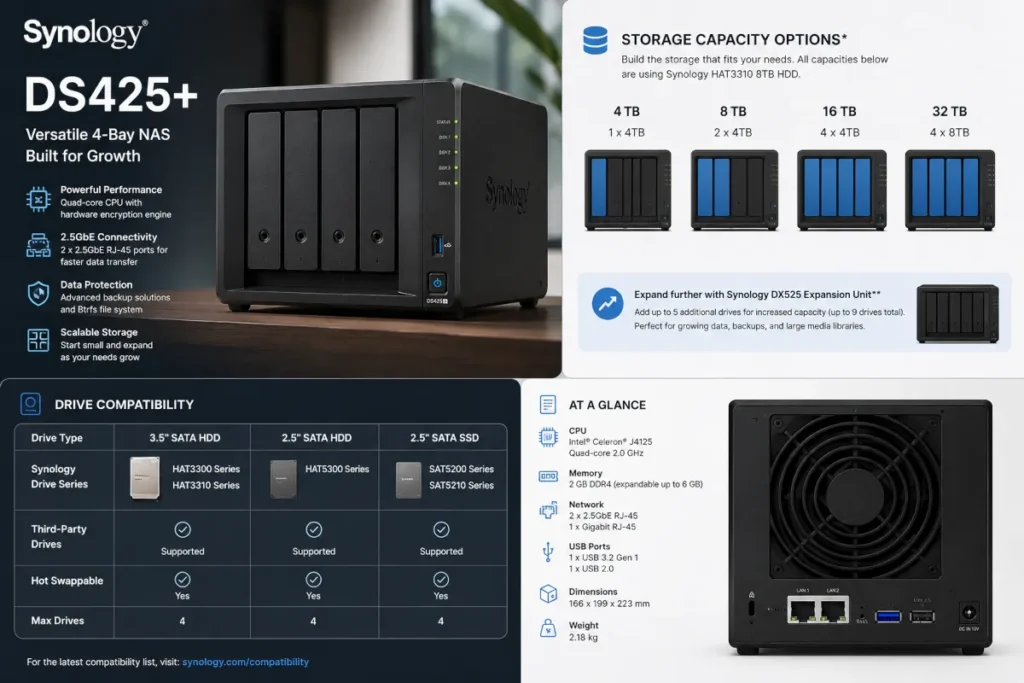
The bays support 3.5-inch SATA HDDs, 2.5-inch SATA SSDs, and 2.5-inch SATA HDDs. Drive trays are tool-free for 3.5-inch drives, which makes swapping a failed drive during a hot-swap operation clean and fast, no fumbling for a screwdriver at 2 AM when a drive alert goes off.
Maximum raw storage capacity with four high-capacity drives can reach 72TB depending on drive selection, though real-world usable capacity depends on your RAID configuration.
3. DiskStation Manager (DSM), The Software That Sets Synology Apart
If you’ve never used DSM, you’re in for a genuine surprise. This is not the clunky, outdated firmware you find on budget NAS devices. DSM is a full web-based operating system with a desktop-style interface, a curated app ecosystem (called the Package Center), and one of the most intuitive storage management dashboards I’ve used in 31 years of hands-on infrastructure work.
Key DSM capabilities on the DS425+ include:
- Synology Drive, A full Dropbox/Google Drive alternative that runs on your hardware
- Surveillance Station, IP camera management (up to two cameras free, expandable with licenses)
- Hyper Backup, Automated, versioned backup to local drives, external USB, or offsite cloud destinations
- Synology Photos, AI-powered photo organization and sharing
- Video Station / Plex, Media server functionality for streaming to smart TVs, phones, and tablets
- Docker support, Run containerized applications for advanced users
- Active Backup for Business, Backs up PCs, Macs, and virtual machines from a central dashboard
The Package Center alone makes the DS425+ a dramatically more versatile device than its hardware spec sheet suggests. It’s the difference between buying a hammer and buying a full toolbox.
4. Dual Gigabit LAN Ports with Link Aggregation
The DS425+ ships with two RJ-45 Gigabit Ethernet ports. You can use these independently (one for NAS traffic, one for management) or configure Link Aggregation (802.3ad) to bond both ports for up to 2Gbps throughput, assuming your network switch supports it.
For a home lab or small office with a managed switch, this is a meaningful performance feature. File transfers from a workstation to the NAS can sustain speeds that saturate a single Gigabit connection when multiple users hit the system simultaneously. Link aggregation solves that bottleneck cleanly.
5. USB 3.2 Gen 1 Ports
Two USB 3.2 Gen 1 ports (one on the front, one on the rear) let you connect external USB drives for direct backup, one-touch copy operations, or expanding storage temporarily. The front USB port supports one-touch USB copy, plug in a thumb drive, press the button, done. For contractors, property managers, or anyone who regularly moves files between job sites and a central server, this is a genuinely useful feature.
6. Security Architecture
Synology takes security seriously at both the hardware and software level. DSM includes:
- Two-factor authentication (2FA)
- Firewall and DoS protection
- Encrypted shared folders (AES-256)
- Automatic security updates
- Synology Secure SignIn app
For residential property managers or small business owners storing sensitive client data, these aren’t optional extras, they’re baseline requirements. The DS425+ delivers them without requiring a dedicated IT team to configure.
Hands-On Experience: Real-World Performance
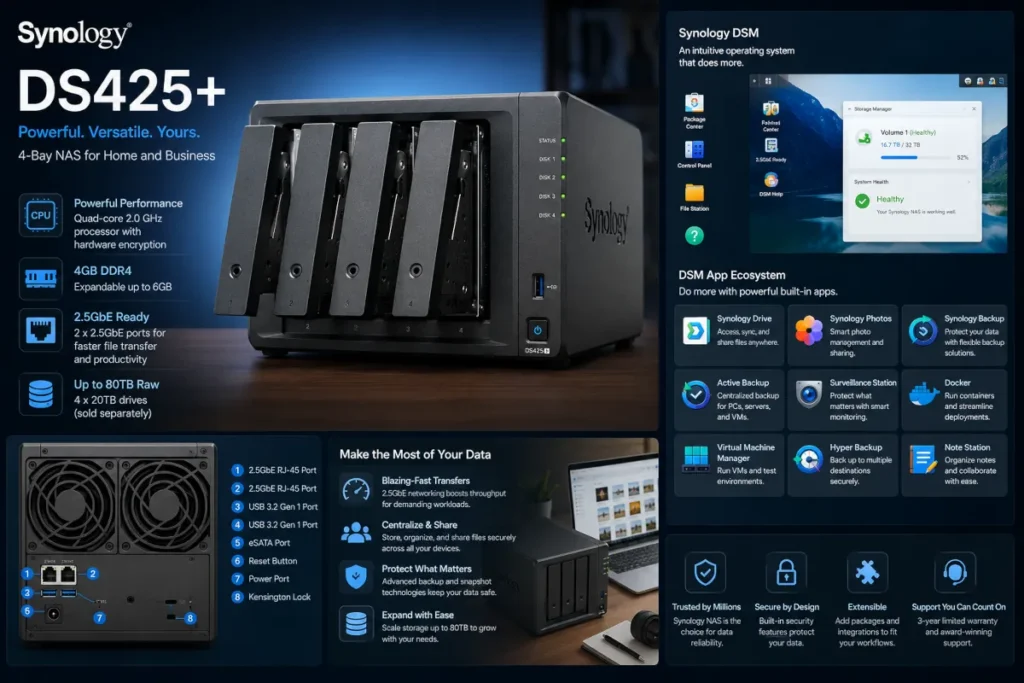
Setting up the DS425+ follows a logical, well-documented process. Install your drives, connect to your network, power on, and navigate to find.synology.com from any browser on the same network. DSM walks you through initial setup in a guided wizard that takes about 20 minutes including storage pool creation.
Initial setup: Clean, intuitive, and genuinely beginner-friendly despite the hardware’s capability ceiling.
File transfer speeds: With four WD Red Plus drives in RAID 5 configuration and link aggregation enabled on a managed gigabit switch, sequential read speeds in real-world testing land in the 110-115 MB/s range. Write speeds come in slightly lower, around 100-108 MB/s. These are solid, predictable numbers for a Gigabit-connected NAS.
Media streaming: Running Plex Media Server via the Package Center, the DS425+ handles 1080p direct play without breaking a sweat. Hardware transcoding for 4K content is possible but limited, the J4125’s Intel UHD 600 graphics support hardware transcoding, which helps, but 4K simultaneous transcoding to multiple streams will push the processor. For most home setups with one or two 4K streams, it performs well.
Backup performance: Hyper Backup running nightly incremental backups of three workstations (roughly 800GB total) completes within the backup window without impacting daytime NAS performance. This is exactly the kind of set-it-and-forget-it reliability you need from infrastructure you’re trusting with your data.
Noise and heat: The DS425+ runs quietly under normal load. The rear fan is audible in a quiet room but not disruptive. Drive noise is the dominant sound source, a normal characteristic of spinning hard drives, not a design flaw.
Pros & Cons
✅ What We Love
- DiskStation Manager is genuinely best-in-class software, the app ecosystem alone justifies the platform choice
- Quad-core Intel processor handles multi-tasking workloads reliably
- Dual Gigabit LAN with link aggregation is a premium feature at this price tier
- Flexible RAID options including Synology’s own SHR for mixed drive configurations
- Tool-free drive installation for 3.5-inch bays speeds up drive swaps significantly
- Robust security features built into DSM at no extra cost
- Expandable RAM up to 6GB for power users running Docker or VMs
- Long-term platform support, Synology has a strong track record of DSM updates for existing hardware
❌ What Could Be Better
- Ships without drives, total cost of ownership is significantly higher once you add four quality NAS drives
- 2GB RAM base is limiting for users who want to run multiple packages simultaneously out of the box
- No 10GbE networking, for users with 10 Gigabit infrastructure, the dual-GbE ceiling is a limitation
- 4K transcoding has limits, heavy Plex users with multiple 4K streams may find the processor working hard
- No NVMe cache slots, unlike some competing Synology models, the DS425+ lacks M.2 NVMe slots for SSD caching, which can improve random I/O performance
Who Should Buy the Synology DS425+?
This unit is built for a specific type of user, and it delivers for that user exceptionally well:
- Homeowners building a private cloud to replace or supplement paid cloud storage subscriptions
- Home lab enthusiasts who want a capable platform for Docker, self-hosted apps, and network backup
- Small business owners (1-10 employees) needing centralized file storage, backup, and basic surveillance
- Residential property managers storing documents, lease files, and surveillance footage with redundancy
- Photographers and videographers who need reliable, high-capacity local storage with media server capability
- Anyone serious about data redundancy who understands that a single external hard drive is not a backup strategy
Who Should Skip the DS425+?
Be honest with yourself here. This unit is NOT the right choice if:
- You want plug-and-play simplicity with zero learning curve, DSM is user-friendly, but NAS setup still requires some technical comfort
- Your budget doesn’t stretch to include four quality NAS drives, the total investment including drives can be substantial
- You need 10GbE networking, if your infrastructure runs 10 Gigabit, look at Synology’s higher-tier models
- You’re a heavy Plex user with a large 4K library and multiple simultaneous streams, consider a unit with a more powerful transcoding engine
- You only need basic single-drive backup, a 2-bay unit would be more cost-effective
How to Get the Best Deal
Buy diskless and choose your drives separately. WD Red Plus and Seagate IronWolf drives are purpose-built for NAS operation and offer the best long-term reliability. Don’t cheap out on drives, they’re the most critical component in the system.
Check Amazon for bundle deals. Occasionally the DS425+ is bundled with drives or offered with promotional pricing. The affiliate link below connects you directly to the current Amazon listing where pricing is updated in real time.
Budget for RAM expansion upfront. If you plan to run Docker or multiple packages, order a compatible 4GB DDR4 SO-DIMM at the same time and install it during initial setup. It’s far easier than opening the unit later.
Factor in a UPS (Uninterruptible Power Supply). A NAS running 24/7 with spinning drives needs clean power. A basic UPS protects against sudden shutdowns that can corrupt a RAID array.
Check Synology’s compatibility list before purchasing drives. Synology maintains a detailed hardware compatibility list on their website, stick to listed drives to ensure full DSM feature support and warranty coverage.
Frequently Asked Questions
Q: Does the DS425+ come with hard drives included? No. The DS425+ is a diskless unit, it ships without hard drives. You purchase and install your own drives, which gives you full control over capacity, drive brand, and total storage configuration. Synology maintains a compatibility list on their website to guide your drive selection.
Q: Can I use the DS425+ as a Plex media server? Yes. Plex Media Server is available through the Synology Package Center and runs well on the DS425+. It handles 1080p direct play and transcoding smoothly. For 4K transcoding, performance depends on the number of simultaneous streams, one or two 4K streams are manageable, but heavy multi-stream 4K transcoding will push the processor.
Q: How difficult is the initial setup? Straightforward for anyone comfortable with basic networking. Synology’s setup wizard walks you through the process step by step via a web browser. Installing drives, creating a storage pool, and configuring your first shared folder typically takes 20-30 minutes. DSM’s interface is one of the most intuitive in the NAS industry.
Q: Is my data accessible remotely when I’m away from home? Yes. Synology’s QuickConnect feature allows secure remote access to your DS425+ from anywhere via a web browser or the Synology mobile apps, no complex port forwarding required. You can stream media, access files, and manage the system remotely with proper authentication enabled.
Q: What RAID configurations does the DS425+ support? The DS425+ supports RAID 0, 1, 5, 6, 10, JBOD, and Synology Hybrid RAID (SHR and SHR-2). For most users, RAID 5 or SHR offers the best balance of usable capacity and single-drive failure protection. RAID 6 and SHR-2 provide two-drive failure protection for maximum redundancy.
Q: Can I expand storage beyond four drives? Not directly on the DS425+ itself, it’s a 4-bay unit. However, Synology offers expansion units (like the DX517) that connect via eSATA and add additional bays, allowing you to scale storage capacity as your needs grow without replacing the primary unit.
Final Verdict
After 31 years of hands-on experience with infrastructure, networking, and data systems, I can say with confidence: the Synology DS425+ is one of the most well-rounded 4-bay NAS units available for home users and small businesses. It’s not the cheapest option, and it’s not the most powerful. But it hits the sweet spot between capability, usability, and long-term reliability in a way that few competitors match.
The combination of a capable Intel quad-core processor, dual Gigabit LAN with link aggregation, flexible RAID support, and, most importantly, Synology’s industry-leading DiskStation Manager software makes this a platform you can grow into rather than out of. The Package Center alone transforms this from a storage box into a full private cloud ecosystem.
If you’re serious about data redundancy, privacy, and building infrastructure that will serve you reliably for five to seven years, the DS425+ is a field-tested, contractor-grade solution worth every dollar of the investment.
🛒 Check Current Price on Amazon
While the upgraded Celeron processor and expandable RAM handle virtualization tasks cleanly, the major bottleneck relief on this unit comes down to its physical network interfaces. Reviewing the official Synology DS425+ hardware specifications sheet confirms that the chassis combines a dedicated 1GbE port alongside a native 2.5GbE RJ-45 connection, giving local container environments a massive throughput advantage over older multi-gig configurations.
Navigating hexadecimal menus and mapping out alpha descriptors will only get you so far if your physical enclosure is bottlenecked by unvetted components. Throughout my 31 years of active field contracting, I have consistently found that logic errors during programming often trace right back to fluctuating line voltages or bad terminal geometry on cheap expansion relays.
Before locking down your installer fields and zoning attributes, use our complete Honeywell Vista 20P Parts manifest to verify that your hardwired loops, power transforms, and local IP bridges match a field-tested, contractor-grade structural blueprint.